
 Microsoft Power BI
 21.06.2026
12, Rue du Chateau D'eau, Leudelange, L-3364, Luxembourg
 Microsoft Power BI
21.06.2026
Microsoft Power BI
21.06.2026
In 2026, a secure Power BI tenant isn't defined by what you lock down, but by how effectively you automate protection across the entire Microsoft Fabric ecosystem. You likely feel the pressure of balancing open, self-service analytics with the growing complexity of managing Row-Level Security (RLS) and preventing accidental data leaks during exports. It's a difficult tightrope to walk, especially as the integration between reporting and lakehouses becomes more seamless. We understand the concern that one wrong click could expose sensitive financial data or private corporate assets to the wrong audience.
This guide will empower you to master every layer of Power BI data security, ensuring your sensitive corporate assets remain protected without sacrificing the high-performance environment your team needs to thrive. You'll learn how to build a robust framework that scales with your organization's growth. We'll explore automated data protection policies, the latest Fabric-integrated governance models, and how to manage the security implications of AI-driven tools like Copilot for DAX. This methodical approach ensures a compliant, future-proof environment for your enterprise while maintaining the speed of modern business intelligence.
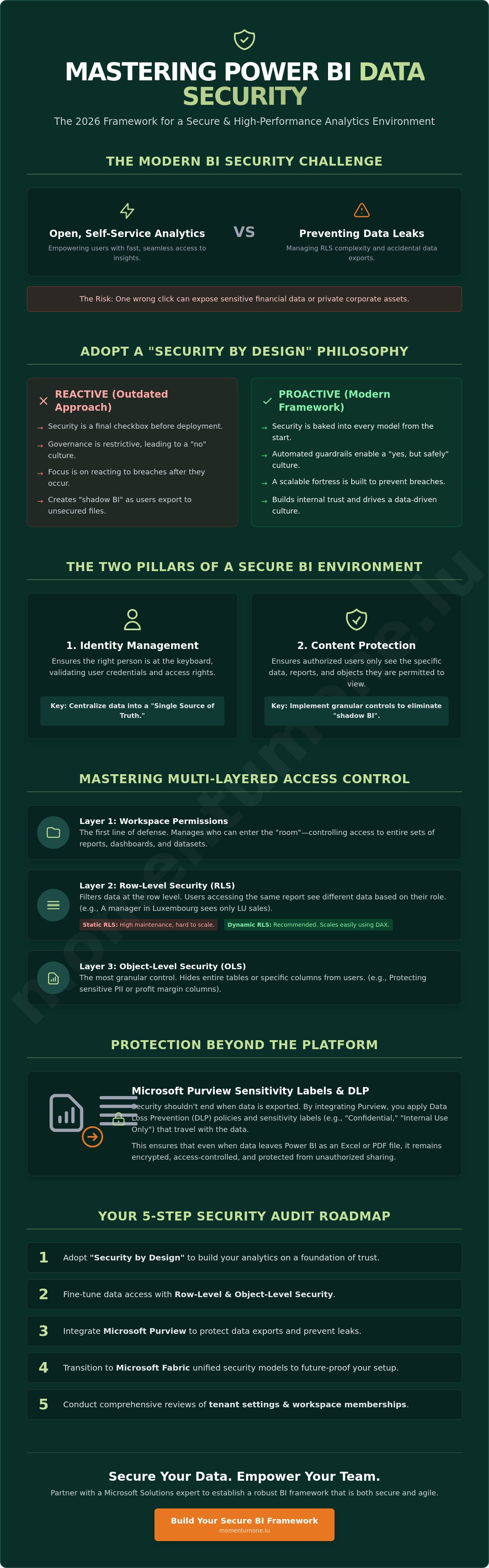
The 2026 business environment demands a fundamental shift in how we handle information. For years, organizations treated protection as a final checkbox before deployment. Today, leading enterprises in Luxembourg and across Europe adopt a "Security by Design" approach. This means Power BI data security is baked into every data model, report, and workspace from the very first line of DAX. It's no longer about reacting to breaches. It's about building a fortress that scales with your ambition. We see this transition as a move toward proactive maturity where security drives performance rather than hindering it.
Achieving this balance is the primary challenge for modern BI teams. You need to provide decision-makers with instant access to insights while adhering to strict corporate compliance and Data security principles. When your security posture is robust, it does more than just protect assets. It builds internal trust. Users who know the data is governed and accurate are more likely to rely on automated reporting for high-stakes decisions. This trust is the currency of a data-driven culture.
Sophisticated AI-driven data exfiltration attempts now characterize the 2026 risk environment. These threats can often bypass traditional perimeter security that relied on internal networks. In a cloud-first BI world, the physical "wall" around your office no longer provides sufficient protection. Your data lives in the cloud, on mobile devices, and in home offices across the region. For businesses operating under EU regulations, the cost of non-compliance isn't just a fine in Euro; it's a permanent loss of reputation. Relying on outdated security models is a risk no enterprise can afford to take.
A secure environment rests on two distinct pillars: identity management and content protection. Identity ensures the right person is at the keyboard, while content protection ensures they only see what they're authorized to see. Centralizing your data into a "Single Source of Truth" is essential here. It eliminates the "shadow BI" created when users export data to unsecured Excel files because they can't get what they need from the official system. Implementing Power BI data security at the architectural level ensures these pillars remain standing even as your user base grows.
Effective governance actually enables user freedom. When the guardrails are clear and automated, users can explore data without fear of breaking a rule or exposing sensitive figures. Partnering with a Microsoft Solutions Partner helps you establish these frameworks. We help you move from restrictive "no" cultures to "yes, but safely" environments. This supportive partnership ensures your team remains agile while your data stays locked down, positioning your brand as a reliable strategist in a complex field.
Granular access control represents the next frontier in your Power BI data security strategy. While workspace permissions manage who can enter the room; security roles determine exactly which files they can open once inside. This distinction is vital for Luxembourgish enterprises handling sensitive Euro-denominated financial records or personnel data across multiple jurisdictions. We focus on two primary mechanisms to achieve this: Row-Level Security (RLS) and Object-Level Security (OLS).
Implementing Row-Level Security (RLS) allows you to use a single report to serve an entire organization while ensuring users only see data relevant to their specific role or region. For example; a country manager in Luxembourg only sees LU sales, while the CFO maintains a global view. Object-Level Security (OLS) takes this a step further by hiding specific columns or tables entirely. This is particularly useful for protecting sensitive PII or margin calculations that should remain invisible to the broader sales team even if they have access to the general report.
Static RLS involves creating fixed roles for every possible scenario. While simple for small teams; it quickly becomes a maintenance nightmare as your organization grows. We recommend a dynamic approach using the USERPRINCIPALNAME() function in DAX. This method maps the user's login identity against a security table in your model, allowing for a single, scalable role that adapts to the viewer. To keep management efficient, you should automate role assignments by linking them to Entra ID (formerly Azure AD) groups. This ensures that when a team member changes roles or leaves the company, their data access updates automatically without manual intervention in the Power BI Service.
There is a direct connection between your security logic and your report's responsiveness. Every RLS filter you apply acts as an additional FILTER statement injected into every query your report generates. If your DAX logic is overly complex or relies on bidirectional cross-filtering; your users will experience frustrating lag. Complex RLS filters act as an additional layer of calculation for every visual, which can noticeably increase query duration and resource consumption in large-scale enterprise datasets.
To maintain a high-performance environment, you must optimize your data model. A clean star schema is your best defense against security-related slowdowns. Avoid applying filters to large fact tables directly; instead, filter smaller dimension tables that propagate security through one-to-many relationships. If you're concerned about how your security architecture might be impacting user experience; our team offers specialized Data Modeling & DAX Optimization to ensure your protection doesn't come at the cost of speed.
Before deployment, always use the "View as" feature in Power BI Desktop and the Power BI Service to validate your roles. Testing as a different user is the only way to guarantee that your filters are working as intended and that no sensitive data is leaking through. This methodical validation builds the confidence your leadership needs to embrace self-service analytics across the enterprise.
Power BI reports remain secure while they're viewed within the service. The risk profile changes the moment a user clicks "Export to Excel" or "Download as PDF." In 2026; your Power BI data security strategy must extend beyond the browser. We ensure this by integrating Microsoft Purview Information Protection; which allows security policies to travel with the data itself. This means that if a sensitive report is exported to a PowerPoint deck or a spreadsheet; the encryption and access restrictions remain active; regardless of where the file is stored.
For Luxembourgish firms handling complex financial records or private investment data; this persistent protection is a non-negotiable requirement. When you apply a sensitivity label; you're embedding metadata that tells the Microsoft 365 ecosystem how to treat that specific asset. This prevents unauthorized users from opening the file even if they manage to acquire it through an accidental email forward or an unencrypted USB drive.
Success starts with a clear classification hierarchy. You should define levels ranging from "Public" and "Internal" to "Confidential" and "Highly Confidential." In the current 2026 landscape; manual labeling is no longer the standard. We now leverage automated label inheritance. When a data source in Microsoft Fabric is classified as sensitive; every downstream Power BI report and semantic model automatically adopts that same label. This reduces the administrative burden on your report creators while ensuring consistent governance across the entire data lineage.
Data Loss Prevention (DLP) policies for semantic models act as an automated safety net. These policies scan your datasets for sensitive information types like IBANs; credit card numbers; or specific EU identification formats. When the system detects a potential risk; it can trigger a "policy tip." This real-time notification educates the user immediately; explaining why a certain action; such as sharing a report externally; is restricted. It's a supportive way to enforce compliance without creating a bottleneck for legitimate work.
To maintain full visibility; you should monitor real-time user activity with Microsoft Defender for Cloud Apps. This tool allows you to audit "oversharing" alerts in the Microsoft 365 compliance portal. You'll receive notifications if a user attempts to download an unusual volume of data or shares a "Highly Confidential" report with an unauthorized guest. This methodical approach to monitoring ensures that your Power BI data security remains proactive; allowing you to identify and mitigate risks before they escalate into incidents.
Microsoft Fabric represents a tectonic shift in how we approach Power BI data security. In previous years; security was often an afterthought applied at the workspace or report level. With the arrival of Fabric; the focus moves upstream to the data itself. The concept of "OneSecurity" introduces a unified permissions layer that spans the entire data stack. This means your security rules are defined once in the Lakehouse and automatically respected by every downstream Power BI report; notebook; or SQL endpoint. It's a more robust; logical way to manage access in a complex enterprise environment.
This evolution changes how you handle the "OneLake" shortcut architecture. Shortcuts allow you to reference data without moving it; but they also require a careful approach to governance. If you're shortcutting data from an external Azure Data Lake into your Fabric environment; you must ensure the underlying permissions remain intact. A failure here could lead to "permission leakage" where users gain access to files they shouldn't see. We help organizations navigate these complexities by auditing the intersection of Fabric identities and legacy Power BI roles to ensure a steady transition.
OneSecurity shifts the burden of protection from the BI developer to the data engineer. By managing access at the Lakehouse level rather than the individual report; you create a more resilient system. This "Compute-level" security ensures that whether a user queries data via a Power BI visual or a Python script in a notebook; the same restrictions apply. This is a significant improvement for managed BI services; as it provides a consistent security posture across diverse tools. It simplifies the environment for your team while strengthening your overall defense without hiding behind complexity.
Migrating to Fabric isn't just a technical upgrade; it's a security modernization. You need to map your legacy Power BI roles to new Fabric identities; ensuring no gaps exist in your Row-Level Security logic. Protecting data pipelines and automated workflows is equally critical; as these processes often move sensitive information between layers. We also recommend leveraging Fabric capacity planning to support secure multi-tenancy; especially for Luxembourgish firms managing distinct business units or external partners. If you're ready to modernize your architecture; our team provides expert Fabric Migration & Modernization services to ensure a seamless and secure transition.
A truly resilient Power BI data security posture isn't achieved through a single setting. It requires a methodical, phase-based review of your entire ecosystem. In the 2026 landscape; where data moves fluidly between Lakehouses and reports; an audit provides the necessary clarity to ensure your guardrails are actually working. We recommend following this five-phase roadmap to secure your tenant:
This structured approach moves your organization from a reactive state to a proactive one. It ensures that every Euro invested in your analytics platform is protected by a framework that scales with your business. By treating security as a recurring process; you build a culture of trust where data is both accessible and safe.
Your audit should start with the most critical "on/off" switches in the Power BI Admin Portal. First; disable the "Publish to Web" feature entirely unless there's a specific; audited reason for public data sharing. This single setting is often the source of accidental data exposure. Second; restrict workspace creation to a specific group of authorized users to prevent "workspace sprawl." Finally; audit external user access. Guest permissions should be reviewed quarterly to ensure that former partners or contractors no longer have a window into your internal datasets.
Professional consulting identifies the hidden security gaps that automated tools often miss. We look beyond the settings to understand your business logic; ensuring your Power BI data security strategy supports your operational goals. While a one-time audit is valuable; the real strength lies in recurring managed services. This ongoing oversight provides a steady hand in a complex field; allowing your team to focus on growth while we handle the evolving threat landscape. If you're ready to secure your assets; you can Schedule a comprehensive Power BI security audit with Momentum One to ensure your environment meets the highest enterprise standards.
Transitioning to a security-first mindset ensures that your corporate data remains a competitive asset rather than a liability. By mastering dynamic access controls and leveraging the unified "OneSecurity" model within Microsoft Fabric; you create an environment where insights flow freely to the right people. Persistent protection through sensitivity labels guarantees that your governance policies remain intact; even when data moves beyond the reporting service into external files.
Building this level of resilience requires a steady hand and deep technical expertise. As a Certified Microsoft Solutions Partner with over 8 years of experience in enterprise data architecture; we specialize in Fabric migration and data governance. We're dedicated to helping you simplify these complexities and build a foundation of trust. Secure your data environment with Momentum One Power BI Consulting to ensure your Power BI data security meets the rigorous standards of 2026. Your journey toward a secure, high-performance analytics tenant is a strategic investment in your organization's future growth.